

A good TV mount should match your screen, wall, and viewing habits—not just the size printed on the box. A fixed position works well when your seating never changes, but a full-motion mount can swivel toward a sofa or dining area and tilt to help reduce glare. The five options below cover everyday TVs, large screens, and extra-large displays. Before choosing one, check your TV’s weight and VESA pattern, then confirm the mount can attach to your wall’s framing or suitable masonry.
Quick Comparison
| TV Mount | TV Size | Weight Limit | Motion | Best For |
|---|---|---|---|---|
| Mounting Dream Full Motion TV Wall Mount | 32–70 inches | 110 lbs | Swivel, tilt; extends 17.5 inches | Standard-size TVs and flexible seating |
| USX MOUNT Full Motion TV Wall Mount, 42–90 Inch | 42–90 inches | 132 lbs | Swivel, tilt; extends 16.49 inches | Large TVs with a slim retracted profile |
| Perlegear UL Listed Full Motion TV Wall Mount | 42–90 inches | 132 lbs | ±50° swivel, tilt; extends 16.6 inches | Large TVs and multiple wall types |
| USX MOUNT Full Motion TV Wall Mount, 37–84 Inch | 37–84 inches | 120 lbs | Swivel, tilt; extends 15.16 inches | Mid-size to large TVs |
| monTEK Heavy Duty Full Motion TV Wall Mount | 60–120 inches | 265 lbs | ±60° swivel, tilt; extends 27.7 inches | Extra-large TVs and long reach |
Our Picks: Best tv mount reviews
Best Overall for Everyday Flexibility: Mounting Dream Full Motion TV Wall Mount

This full-motion mount is a practical fit for many living rooms with TVs from 32 to 70 inches. It supports screens up to 110 pounds and VESA patterns up to 400 by 400 mm. Its six articulating arms let you pull the TV out, swivel it toward a seat, or tilt it to help cut glare.
The mount extends 17.5 inches from the wall and retracts to 3.4 inches. That reach is useful when you want to angle the screen around a corner or bring it closer for access to rear ports. A paper template, labeled hardware bags, and post-install leveling adjustment are intended to make setup more manageable.
The main limitation is its fit range: it is not meant for TVs larger than 70 inches, and its listed wood-stud fit is for standard 16-inch spacing. It is not for drywall alone. Compared with the larger full-motion models below, this is the more focused choice for a typical-size screen rather than an oversized home theater display.
Pros:
- Fits many 32- to 70-inch TVs up to 110 pounds
- 17.5-inch extension gives useful reach
- Tilt and swivel help adjust the screen for different seats
- Includes a paper template and post-install leveling adjustment
Cons:
- Not designed for drywall-only installation
- Listed for standard 16-inch wood-stud spacing
Verdict: Choose the Mounting Dream if your TV falls within its size and weight limits and you want a versatile mount for everyday viewing.
Best for Large TVs with a Slim Retracted Profile: USX MOUNT 42–90 Inch

This dual-arm mount is built for TVs from 42 to 90 inches, with a 132-pound weight limit and VESA compatibility from 200 by 100 mm to 600 by 400 mm. The arms tilt up or down and swivel up to 45 degrees in either direction, though the TV’s size and position can affect its actual swivel range.
It extends 16.49 inches and retracts to 2.4 inches from the wall, making it a good option if you want full-motion adjustment without leaving the screen far out when it is not in use. The kit includes a bubble level, cable ties, labeled hardware, and instructions. A post-install adjustment helps correct the TV’s level after mounting.
This model is designed for wood studs spaced up to 16 inches and is not for drywall alone. Concrete anchors are not included in the package, so masonry installation may require contacting the manufacturer for the appropriate anchors. Compared with the Perlegear, it has a slightly shorter extension and a narrower stated swivel range.
Pros:
- Supports TVs up to 90 inches and 132 pounds
- Retracts to a compact 2.4-inch profile
- Includes a bubble level and cable ties
- Post-install adjustment helps fine-tune screen alignment
Cons:
- Designed for wood studs spaced up to 16 inches
- Concrete anchors must be requested separately
Verdict: This USX MOUNT is a strong match for a large TV on a standard stud wall when a close-to-wall resting position matters.
Best Wall-Type Flexibility for Large Screens: Perlegear UL Listed Full Motion Mount

Perlegear’s full-motion mount is sized for 42- to 90-inch TVs weighing up to 132 pounds. Its VESA range runs from 200 by 100 mm to 600 by 400 mm. The mount is designed for wood studs spaced 8, 12, or 16 inches apart, as well as concrete or brick walls. It is not intended for drywall alone.
Its arms extend 16.6 inches and retract to 3 inches. The mount offers up to 50 degrees of swivel in either direction, tilt from 5 degrees up to 15 degrees down, and a post-install leveling adjustment. Perlegear also describes the mount as UL-listed and says it has been tested through 60,000 motion cycles and at four times its rated load.
The broader stated wall compatibility gives this model an edge over the two USX MOUNT options for some installation setups. For wood studs spaced farther than 16 inches, an extension bracket is needed; confirm that arrangement with the manufacturer before buying. The mount’s size and capacity may be more than necessary for a smaller TV.
Pros:
- Fits many 42- to 90-inch TVs up to 132 pounds
- Designed for several wood-stud spacings, concrete, and brick
- Offers up to 50 degrees of swivel and tool-free tilt
- Includes a drilling template, bubble level, and masonry anchors
Cons:
- Not suitable for drywall alone
- Stud spacing over 16 inches requires an extension bracket
Verdict: Pick the Perlegear if you have a large TV and want more installation flexibility across compatible wall types.
Best Straightforward Fit for Mid-Size and Large TVs: USX MOUNT 37–84 Inch

This dual-arm mount covers a useful middle range: TVs from 37 to 84 inches, up to 120 pounds, with VESA patterns from 200 by 100 mm to 600 by 400 mm. It tilts up or down and swivels up to 45 degrees in either direction, so you can angle the screen toward a nearby seating area.
The mount extends 15.16 inches and retracts to 2.74 inches. Its arms are made of heavy-duty steel, and the package includes a bubble level, cable ties, and labeled mounting hardware. Post-install adjustment allows a small correction to the TV’s level.
It is intended for wood studs spaced up to 16 inches or concrete walls, not drywall alone. Concrete anchors are not included, so plan for the correct anchors if you are mounting to masonry. Compared with the 42–90-inch USX MOUNT, this one supports a smaller maximum screen and weight, but it can suit TVs as small as 37 inches.
Pros:
- Works with TVs from 37 to 84 inches
- Supports up to 120 pounds
- Swivel, tilt, and post-install leveling adjustment
- Includes a bubble level and cable ties
Cons:
- Not designed for drywall-only installation
- Concrete anchors are not included
Verdict: Choose this USX MOUNT when your screen is within its broad size range and you want a full-motion design without moving up to a larger-TV mount.
Best Heavy-Duty Mount for Extra-Large TVs: monTEK Full Motion TV Wall Mount
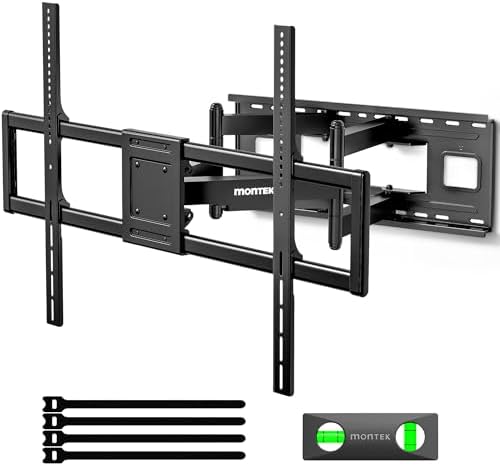
The monTEK is designed for extra-large TVs from 60 to 120 inches and supports up to 265 pounds. Its VESA range, from 200 by 200 mm to 900 by 600 mm, is much broader than those of the other mounts here. Check your TV’s weight and mounting pattern carefully, since this model is intended for screens well beyond standard living-room sizes.
Its standout feature is reach: the arms extend up to 27.7 inches and retract to 2.95 inches. The mount also offers up to 60 degrees of swivel and tool-free tilt. The manufacturer describes it as four-times-load tested. A preassembled structure, quick lock-and-release feature, mounting template, and bubble level are intended to make installation and later access easier.
It is designed for wood studs spaced 12, 16, 18, or 24 inches apart, as well as concrete or brick. That flexibility and long extension make it useful for large screens in open rooms or corner placements, but its capacity is unnecessary for many smaller TVs. Because extra-large screens are heavy and awkward to handle, plan the installation carefully and get help lifting the TV.
Pros:
- Supports TVs from 60 to 120 inches and up to 265 pounds
- Extends 27.7 inches for broad positioning options
- Fits several wood-stud spacings as well as concrete and brick
- Includes a quick lock-and-release feature and mounting template
Cons:
- Too large for TVs below 60 inches
- Extra reach and capacity may be unnecessary for a typical room setup
Verdict: The monTEK is the right choice for a compatible extra-large TV when you need substantial capacity and far more reach than a standard full-motion mount.
How to Choose the Best TV Mount
Match the mount to your TV’s size and weight
Use your TV’s manual or manufacturer page to confirm its screen size and weight without the stand. The mount’s supported size range and weight limit both matter: a TV can fall within the size range but still exceed the weight capacity. For larger screens, leave a comfortable margin rather than choosing a mount that barely meets the TV’s weight.
Check the VESA pattern
VESA is the spacing between the mounting holes on the back of your TV, measured horizontally and vertically. Compare that measurement with the mount’s supported VESA range before you buy. A size match alone does not guarantee that the bracket will line up with your TV.
Choose the motion you will use
A full-motion mount is useful when you need to turn the screen toward different seats, reduce glare with a tilt, or pull the TV out to reach its ports. Think about the room layout and how far you need the TV to extend. A longer arm can help with corner placement or off-center viewing, but it also gives the screen more room to project from the wall.
Confirm your wall and stud spacing
Most of these mounts need to attach to wood studs or a suitable masonry wall; none should be installed into drywall alone. Find the stud locations and measure their spacing before choosing a model. If you have concrete or brick, check whether the correct anchors are included or must be obtained separately, and follow the mount’s installation instructions.
Consider the TV’s position when retracted
Check how far the TV sits from the wall when the arm is folded back. A mount with a shorter retracted depth can give a tidier look, while a longer extension can make it easier to angle the screen or reach cables. Make sure there is enough clearance for the TV, connectors, and nearby walls when you swivel it.
Plan installation and cable access
Templates, labeled hardware, bubble levels, and post-install leveling adjustments can help with setup, but they do not replace careful measuring. Large TVs are difficult to handle alone, so arrange help before lifting one onto a bracket. If you plan to hide cables in the wall, use a cable-management method suitable for that installation and follow local requirements.
Frequently Asked Questions
How do I know if a TV mount will fit my TV?
Check the TV’s screen size, weight, and VESA hole pattern, then compare all three with the mount’s compatibility range. The TV must meet the mount’s weight limit and have a matching VESA pattern, even if its screen size falls within the stated range.
Can I install a TV mount directly into drywall?
These mounts are not intended for drywall alone. They are designed to attach to suitable wood studs or, for certain models, concrete or brick. Follow the installation instructions and use the correct anchors for your wall type.
What does full motion mean?
A full-motion mount uses articulating arms so you can pull the TV away from the wall, swivel it side to side, and tilt it up or down. The range of movement can vary by model and may be limited by the TV’s size or nearby walls.
What is a VESA pattern?
VESA describes the distance between the mounting holes on the back of a TV. Measure the horizontal and vertical spacing in millimeters or check the TV manual, then make sure that pattern falls within the mount’s supported range.
Do I need a mount with a high weight limit?
Choose a mount rated for at least your TV’s weight. A higher capacity is useful for a heavier screen, but it does not make a mount compatible if the VESA pattern, screen size, or wall installation does not match.
Is a longer extension always better?
Not necessarily. A longer arm can help you angle a screen around a corner or reach rear ports, but it may extend farther into the room. Choose enough reach for your viewing setup, and check the mount’s retracted depth too.
Which mount is best for a TV over 90 inches?
Among these options, the monTEK is designed for TVs up to 120 inches and supports up to 265 pounds. Confirm your TV’s weight and VESA pattern, and make sure the wall structure and installation plan are suitable for the load.
Final Recommendation
For most standard living-room setups, the Mounting Dream offers a useful balance of screen compatibility, swivel, tilt, and extension. Choose the Perlegear if wall-type flexibility is a priority, or the 42–90-inch USX MOUNT if a close-to-wall profile matters. For extra-large screens, the monTEK stands apart with its greater capacity and longer reach. Whichever you choose, verify the TV’s weight, VESA pattern, and wall structure before installation.