

A projector-and-screen bundle can make an outdoor movie night easier to plan, but the right setup depends on more than whether a screen is in the box. Resolution, streaming options, sound, connections, and how you’ll power and position the projector all matter. Our picks include two clear screen bundles, one projector whose title indicates a screen is included, and a few screen-free options for shoppers who already have a display or want to choose one separately.
Quick Comparison
| Projector | Screen | Resolution | Standout feature | Best for |
|---|---|---|---|---|
| Aurzen Roku TV D1R | Not included | 1080p Full HD | Built-in Roku TV, autofocus, and auto keystone | Simple streaming without a separate device |
| CEBORY Portable Projector | Foldable 100-inch screen | Native 1080p | Screen and carrying bag included | A ready-to-carry movie setup |
| TMY V88 Projector | Foldable screen included | Native 1080p | Wireless mirroring and Bluetooth audio | A portable starter bundle |
| Roconia 1080p Projector | Screen included | Native 1080p | Wide range of device connections | Flexible wired and wireless setups |
| WiMiUS P62 Pro | Not included | Native 1080p; supports 4K sources | Built-in apps, Wi-Fi 6, and 600 ANSI brightness | Streaming and connection flexibility |
Our Picks: Best Projectors With Outdoor Screen Bundles reviews
Aurzen Roku TV D1R: Best for Easy Built-In Streaming

The Aurzen D1R is a portable 1080p projector with Roku TV built in. That makes it a convenient pick if you want to open streaming apps from the projector rather than connect a separate streaming stick. Roku activation requires an internet connection and a Roku account.
For a backyard setup, its automatic focus and keystone correction can help get a sharp, aligned picture after you position it. The projector is designed for a 60- to 150-inch image, and its dual 5-watt speakers handle basic audio without extra equipment. Bluetooth 5.2 also lets you connect compatible headphones or speakers.
The main trade-off for bundle shoppers is that a screen is not included, so you’ll need a suitable wall or a separately purchased screen. Built-in streaming is useful, but outdoor use still depends on a reliable Wi-Fi connection and a dark viewing area. Choose this model if easy app access matters more than getting every piece of the screen setup in one box.
Pros:
- Roku TV and popular streaming apps are built in.
- 1080p resolution with automatic focus and keystone correction.
- Bluetooth connection for compatible headphones or speakers.
- Dual 5-watt speakers are built into the projector.
Cons:
- No projection screen is included.
- Roku activation requires internet access and an account.
Verdict: Pick the Aurzen if you want a straightforward streaming projector and are comfortable sourcing your outdoor screen separately.
CEBORY Projector: Best Complete Screen-and-Carry Bundle

The CEBORY package is the clearest all-in-one option in this group: it includes a foldable 100-inch screen and a reinforced carrying bag along with the projector. The washable screen is intended for easy storage and transport, making the bundle a practical fit for backyard gatherings, campsites, and trips where bringing a separate display would be a hassle.
The projector has native 1080p resolution and supports a display up to 300 inches. It also offers dual-band Wi-Fi, Bluetooth 5.3, AirPlay, and screen mirroring for compatible devices. Built-in stereo speakers with SRS sound provide an audio option without an external speaker, though a Bluetooth speaker or headphones may be a better fit when you want more control over sound.
The screen’s 100-inch size gives you a defined starting point for setup, while the much larger maximum image claim should not be mistaken for a guarantee of a bright, clear picture at every size. For outdoor viewing, a dark setting and careful positioning remain important. This is the strongest choice here if a portable screen and carrying bag are central to your purchase.
Pros:
- Includes a foldable 100-inch screen and carrying bag.
- Native 1080p resolution and a stated maximum display size of 300 inches.
- Supports dual-band Wi-Fi, Bluetooth 5.3, AirPlay, and screen mirroring.
- Built-in stereo speakers offer a no-extra-speaker option.
Cons:
- Wireless mirroring and streaming depend on compatible devices and a stable connection.
- The bundle is larger to transport than a projector alone.
Verdict: Choose the CEBORY if you want a clearly defined screen bundle that is ready to pack for outdoor movie nights.
TMY V88: Best Portable Starter Bundle for 1080p Viewing

The TMY V88 pairs a native 1080p projector with a foldable screen, making it a straightforward starting point for a portable movie setup. Its screen is described as anti-wrinkle and washable.
The projector supports 4K video sources, but its native resolution is 1080p, so it does not display a native 4K image. It offers 5G Wi-Fi mirroring for compatible iOS and Android devices, Bluetooth 5.1 audio connections, and built-in speakers. The projector can display an image from 30 to 300 inches, with manual keystone correction for adjusting the picture.
One important setup point is content access: the manufacturer notes that some copyrighted streaming video may require a wired connection through HDMI or a compatible streaming device rather than phone mirroring. That makes the V88 less seamless for some streaming habits than the Aurzen or WiMiUS, but its included screen makes it a useful bundle for simple, portable viewing.
Pros:
- Includes a foldable, washable screen.
- Native 1080p resolution with support for 4K video sources.
- Bluetooth 5.1 can connect compatible speakers or headphones.
- Offers a broad 30- to 300-inch image range.
Cons:
- Some protected streaming content may require HDMI or a streaming device.
- Keystone adjustment is manual rather than automatic.
Verdict: The TMY V88 is a sensible starter bundle if you want a screen and native 1080p image, and you’re willing to use a wired source for some streaming apps.
Roconia 1080p Projector: Best for Flexible Device Connections
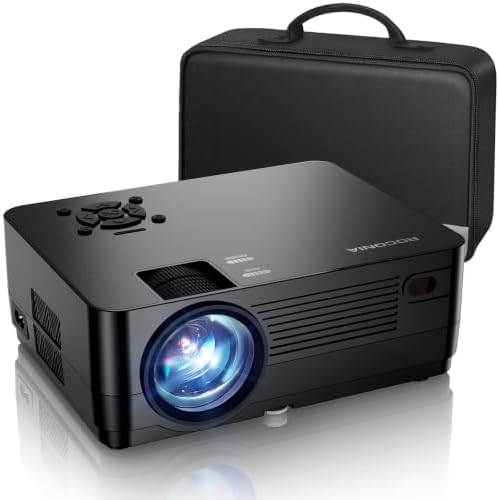
The Roconia is a native 1080p projector with a screen included, giving bundle shoppers another route to a ready-made outdoor setup. Its connection options are a major part of the appeal: it has two HDMI ports, two USB ports, AV, VGA, and a 3.5mm headphone jack, along with dual-band Wi-Fi and Bluetooth 5.1.
That range can be useful if your setup includes a laptop, game console, streaming stick, or external audio gear. The projector supports a display from 30 to 300 inches and has built-in stereo speakers. For better sound or private viewing, you can use a compatible Bluetooth device or connect through the audio jack.
The Roconia’s flexibility comes with more setup choices to manage than an autofocus model. Its screen size is not included in the product name, so confirm the dimensions if you need the display to fit a particular space. Consider it if you value broad device compatibility and want a screen bundled with the projector.
Pros:
- A screen is included with the projector.
- Native 1080p resolution and a stated display range of 30 to 300 inches.
- Multiple HDMI, USB, AV, and VGA connections.
- Supports Wi-Fi mirroring and Bluetooth audio connections.
Cons:
- The included screen’s size should be confirmed before purchase.
- Manual positioning may take more adjustment than a model with autofocus and auto keystone.
Verdict: Pick the Roconia if you want a bundled screen and the flexibility to connect several kinds of video and audio devices.
WiMiUS P62 Pro: Best Screen-Free Pick for Built-In Apps

The WiMiUS P62 Pro is the most feature-focused screen-free option here. It has built-in apps, an app store, and a browser, so you can stream without starting with an external device. It also has Wi-Fi 6, AirPlay for iOS, and Miracast for compatible Android and Windows devices.
Its native resolution is 1080p, with support for 4K sources. The projector is rated at 600 ANSI brightness and supports HDR10. Dual 10-watt speakers with Dolby audio are built in, and the HDMI ports include ARC and CEC support on one port for compatible equipment. The screen is not included, so plan to pair it with a separate display or suitable projection surface.
With built-in apps and several connection options, the P62 Pro suits a setup where convenience matters more than getting a screen in the same package. Keep in mind that a supported 4K source is shown at the projector’s native 1080p resolution, not as a native 4K image. The stated brightness does not remove the need to control outdoor light, so evening use is still the better match.
Pros:
- Built-in apps and browser support streaming without an external device.
- Native 1080p resolution, with 4K source support and HDR10.
- Wi-Fi 6, AirPlay, Miracast, and dual HDMI connections.
- Dual 10-watt speakers with Dolby audio are built in.
Cons:
- No screen is included.
- 4K sources display at the projector’s native 1080p resolution.
Verdict: Choose the WiMiUS P62 Pro if you already have a screen and want built-in streaming, strong connectivity, and higher-wattage speakers.
How to Choose a Projector With an Outdoor Screen Bundle
Check What the Bundle Actually Includes
A screen bundle can save you from having to match a projector to a display separately, but screen sizes and accessories vary. The CEBORY includes a foldable 100-inch screen and carrying bag, while the TMY and Roconia also include screens. The Aurzen and WiMiUS do not include one. If screen dimensions, a stand, or a carrying case matter to your setup, confirm those details before choosing.
Choose a Screen Size That Fits Your Space
A bigger projected image is not automatically a better outdoor picture. Consider how much room you have, how far back viewers will sit, and whether the screen can be placed securely. A bundle with a defined screen size gives you a clear starting point; a projector-only choice lets you select a screen that fits your yard or travel plans.
Understand Native Resolution and 4K Support
Native resolution describes the detail the projector displays. The CEBORY, TMY, Roconia, and WiMiUS models in this selection have native 1080p resolution; the WiMiUS and TMY can accept 4K video sources, but display at 1080p. Compare native resolution first if image detail is important to you, and treat “4K support” as source compatibility rather than native 4K display.
Plan for Outdoor Light
Outdoor projectors generally work best after sunset, when less ambient light competes with the image. A brightness figure can help with comparisons, but it does not guarantee a bright picture in direct or strong surrounding light. If you plan to watch before it gets fully dark, look closely at the projector’s brightness information and keep the image size reasonable.
Consider How You’ll Stream
Built-in streaming can reduce setup steps. The Aurzen has Roku TV, and the WiMiUS includes built-in apps. Other models support forms of wireless mirroring, but compatibility and access to protected streaming video can vary. If you want the fewest connections, favor a projector with built-in apps; if you already use a streaming stick, laptop, or console, check for the ports you need.
Decide Whether Built-In Sound Is Enough
Every model in this roundup has built-in speakers, but outdoor sound can be harder to hear than indoor audio. Bluetooth support on these projectors offers a way to connect compatible speakers or headphones. For a group, consider where the projector and speakers will sit and whether you need to connect audio by Bluetooth or a cable.
Look at Setup and Portability
Autofocus and auto keystone correction can simplify setup when you move a projector between locations. The Aurzen includes both. The other projectors offer different connection and mirroring features, but may call for more hands-on positioning. If you’ll carry your setup to a campsite or another location, consider the screen’s foldability, storage, and whether the bundle includes a carrying bag.
Frequently Asked Questions
Which projector in this roundup includes a 100-inch screen?
The CEBORY bundle includes a foldable 100-inch screen and a reinforced carrying bag. The TMY and Roconia also include screens, but check their package details for the screen dimensions that matter to your setup.
Do all of these projectors come with an outdoor screen?
No. The CEBORY, TMY, and Roconia include screens. The Aurzen Roku TV D1R and WiMiUS P62 Pro do not, so you’ll need to use a suitable wall or purchase a screen separately.
Can these projectors show a native 4K image?
The projectors in this roundup are described as native 1080p models or, in the Aurzen’s case, a 1080p Full HD model. The TMY and WiMiUS support 4K sources, but their images display at native 1080p resolution.
Can I stream directly without connecting a separate device?
The Aurzen has Roku TV built in, and the WiMiUS has built-in apps and a browser. Other models offer wireless mirroring or wired connections, but some protected streaming content may require HDMI or a compatible streaming device.
Are built-in projector speakers enough for an outdoor movie?
They can work for casual viewing, but open spaces may make sound harder to hear. Each model has built-in speakers, and Bluetooth or wired audio connections on these projectors can give you other listening options.
Is a projector’s maximum screen size the best size to use outside?
Not necessarily. A projector may support a large image, but the viewing space, screen size, distance, and surrounding light all affect the result. Start with a screen size that fits your setup and adjust the projector position as needed.
Final Recommendation
For the most complete portable bundle, the CEBORY is the clearest fit because it includes a foldable 100-inch screen and carrying bag. The TMY and Roconia are alternatives if you want a screen included and prefer their particular mix of portability or connections. If you already own a screen, the Aurzen makes streaming simple with Roku TV, while the WiMiUS offers built-in apps and broad connectivity. Choose based on the screen you need, how you plan to stream, and how much setup flexibility matters to you.