

A projector with lens shift can make a home theater easier to set up because you can move the image into position without relying only on digital correction. The models below pair 4K resolution with different amounts of placement flexibility, brightness, color performance, and smart features. Before choosing, check the lens-shift range and throw ratio against your room—not just the headline specs.
Quick Comparison
| Projector | Brightness | Lens shift and zoom | Standout features | Best for |
|---|---|---|---|---|
| XGIMI HORIZON 20 Max | 5,700 ISO lumens | Lens shift and optical zoom; range not specified | Triple laser, Google TV, licensed Netflix | Bright, flexible all-around use |
| JMGO N3 Ultimate | 5,800 ISO lumens | Four-way lens shift, 0.88–1.7:1 optical zoom, motorized gimbal | Google TV, Dolby Vision, gaming features | Tricky room layouts and broad placement options |
| XGIMI TITAN Noir | 4,800 ISO lumens | V ±130% / H ±50% lens shift, 2x optical zoom | Triple laser, dual iris, 3D support | Dedicated theater and gaming setups |
| BenQ W4100i | 3,200 lumens | 2D lens shift and 1.3x zoom | 100% DCI-P3, factory calibration, Android TV | Color-focused rooms with controlled light |
Brightness figures use the units provided for each product and may not be directly comparable. The supplied product data marks the BenQ listing as unavailable.
Our Picks: Best 4K projectors for home theater with lens shift reviews
XGIMI HORIZON 20 Max: A bright, flexible laser projector
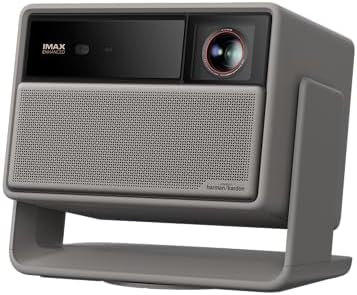
The HORIZON 20 Max combines a triple-laser light source with 4K projection and a stated peak brightness of 5,700 ISO lumens. Its lens shift and optical zoom give you more options for fitting the image to your screen than a projector that depends on digital adjustment alone. The listing does not specify the lens-shift range, so check the product details if your installation needs a large vertical or horizontal adjustment.
Google TV and licensed Netflix are built in, which can simplify a setup if you want to stream without adding a separate device. XGIMI also lists gaming features including 1ms input lag and up to 240Hz motion. Those headline figures are worth checking against the input resolution and settings you plan to use, since performance can depend on the selected mode and source.
The product’s high stated brightness may suit a room that is not fully dark, while its wide color coverage is aimed at vivid picture quality. Still, a bright projector cannot eliminate the effect of room light on contrast; a darker room and a suitable screen remain important for a cinema-style image. Its lens-shift range is not provided in the supplied information, which makes it harder to judge for installations with unusual mounting positions.
Pros:
- Triple-laser light source with a stated 5,700 ISO lumens of peak brightness.
- Lens shift and optical zoom allow more placement flexibility.
- Google TV and licensed Netflix are built in.
- Lists 1ms input lag and up to 240Hz motion for gaming.
Cons:
- The lens-shift range is not specified in the supplied product details.
- Its brightness and gaming claims do not replace checking your room, screen, and source-device requirements.
Verdict: Choose the HORIZON 20 Max if you want a bright triple-laser projector with streaming built in, but confirm its lens-shift range before planning a fixed installation.
JMGO N3 Ultimate: The most adjustable option for difficult rooms

The JMGO N3 Ultimate is built around placement flexibility. Its four-way lens shift is listed at H ±53% and V ±130%, and it pairs that with a 0.88–1.7:1 optical zoom. A motorized gimbal adds 360-degree panning and 150-degree tilting, giving you several ways to aim the projector before you fine-tune the image. The maker describes these as physical adjustments that preserve resolution rather than digitally cropping the picture.
It also has a stated 5,800 ISO lumens, a triple-laser engine, and support for Dolby Vision. Google TV, native Netflix, and built-in Chromecast cover common streaming needs. For gaming, the listed features include VRR, up to 240Hz refresh rates, and 1ms input lag. As with any projector, check which formats and settings support the performance you want.
The broad adjustment range makes this model especially interesting if your shelf, ceiling mount, or seating layout limits where a projector can go. Its motorized movement may also help when the projector is bumped or needs repositioning. The trade-off is that its many setup features may be more than you need if you have a centered, fixed installation. The manufacturer’s brightness and contrast figures are specifications, not a guarantee of the same result in every room.
Pros:
- Wide stated horizontal and vertical lens-shift range.
- Optical zoom and a motorized gimbal add further placement options.
- Google TV, native Netflix, and Chromecast are included.
- Lists Dolby Vision and gaming features such as VRR.
Cons:
- The large number of setup and gaming features may be unnecessary for a simple, fixed theater.
- Brightness and contrast results depend on room conditions and setup.
Verdict: The N3 Ultimate is the strongest fit if your room needs generous lens movement, optical zoom, and flexible aiming in one projector.
XGIMI TITAN Noir: A theater-focused model with wide lens shift

The TITAN Noir pairs 4K laser projection with a stated 4,800 ISO lumens and RGB triple-laser illumination. For installation, it offers a 0.98–2.0:1 throw ratio, 2x optical zoom, and lens shift listed at V ±130% and H ±50%. That combination can help you fit the picture around a ceiling mount, shelf, or seating area without relying only on digital correction.
XGIMI lists a dual-iris optical system with up to 7,000:1 native contrast, plus dynamic enhancement technology. Native and dynamic contrast are different measures, so the dynamic figure should not be treated as the same thing as a fixed native contrast result. The projector also supports Blu-ray 3D and lists gaming features such as VRR, ALLM, AMD FreeSync, and up to 240Hz motion.
This is a more installation-focused choice than the HORIZON 20 Max, with detailed shift and zoom ranges that make room planning easier. It may suit a dedicated theater or a setup that also serves as a large-screen gaming display. The supplied details do not list a built-in streaming platform, so plan for an external streaming device if you want apps on the projector itself.
Pros:
- Specified vertical and horizontal lens shift with 2x optical zoom.
- RGB triple-laser light source and 110% BT.2020 color coverage as listed.
- Supports Blu-ray 3D formats.
- Lists VRR, ALLM, AMD FreeSync, and up to 240Hz motion.
Cons:
- The supplied product details do not identify a built-in smart TV platform.
- Some contrast figures are dynamic enhancements rather than native contrast measurements.
Verdict: Consider the TITAN Noir if you want specified lens-shift and zoom ranges for a dedicated theater, and are comfortable adding a streaming device if needed.
BenQ W4100i: Color-focused 4K with a traditional theater setup

The BenQ W4100i is a 4K HDR projector with a stated brightness of 3,200 lumens. Its main draw is color: BenQ lists 100% DCI-P3 coverage and factory-calibrated color. HDR-PRO features include local contrast enhancement and tone mapping, designed to help preserve detail in bright and dark parts of a scene.
For installation, it includes 2D lens shift and a 1.3x zoom. The supplied details do not give a shift range, so confirm that the adjustment will work for your planned mount position. Android TV and preloaded Netflix are listed for streaming. BenQ also specifies a long-life LED light source and a three-year limited warranty.
Its stated brightness is lower than the ISO-lumen figures listed for the laser models, but the units are not directly comparable. This model may make more sense in a room where you can control ambient light and value color coverage and calibration. The supplied product data marks the listing as unavailable, so check whether it can be purchased before making it your first choice.
Pros:
- 100% DCI-P3 color coverage and factory-calibrated color are listed.
- 2D lens shift and 1.3x zoom support flexible placement.
- Android TV and preloaded Netflix are included in the product description.
- Lists a three-year limited warranty.
Cons:
- The supplied data marks the product as unavailable.
- The lens-shift range is not specified in the supplied details.
Verdict: The W4100i is a promising option for a light-controlled theater where color accuracy matters, but verify availability and lens-shift fit before choosing it.
How to Choose a 4K Home Theater Projector with Lens Shift
Match the lens-shift range to your mounting position
Lens shift moves the projected image while letting the projector stay in place. Compare the listed horizontal and vertical range with the distance between your projector’s lens and the center of your screen. A larger range can make it easier to use a shelf or ceiling mount that is not perfectly aligned, but it does not mean every position will work. When a product does not state its range, ask for the installation details before you commit to a fixed mount.
Check throw ratio and optical zoom for your room
Throw ratio helps you work out how far the projector needs to sit from the screen to make a given image size. Optical zoom lets you adjust image size within a range without moving the projector. Compare the projector’s throw ratio with your room depth, screen size, and planned mounting location. Lens shift changes where the image lands; it does not replace checking the throw distance.
Understand brightness claims and room lighting
Ambient light can wash out a projected image, especially dark scenes. A brighter model may give you more flexibility in a room that is not fully dark, while a controlled-light theater can make it easier to appreciate contrast. These listings use different brightness units, so do not assume that ISO-lumen and lumen figures are directly comparable. Consider your screen and lighting conditions alongside the stated number.
Look beyond the word “4K” for picture quality
Resolution is only one part of the image. Color coverage, HDR handling, contrast, and the screen all affect what you see. Features such as tone mapping or dynamic contrast can shape the picture, but specifications with different measurement methods should not be compared as if they were identical. If film color is a priority, pay attention to the stated color coverage and calibration details.
Decide whether you want built-in streaming
Some projectors in this group list Google TV or Android TV, while the TITAN Noir product details do not specify a built-in streaming platform. Built-in apps can reduce the number of devices and remotes in your setup. If streaming is important, confirm that the apps you use are supported and consider whether you would rather connect a separate streaming device.
Check gaming features against your devices
Low input lag, high refresh rates, VRR, and ALLM can matter if you plan to play games on a large projected image. Check the projector’s supported modes and connections against your console or PC; headline performance claims may depend on the selected resolution and settings. If movies are your main use, these gaming features may be less important than lens placement and picture quality.
Think about setup, sound, and long-term support
Consider whether the projector’s automatic setup, motorized movement, or built-in speakers will help in your room. The JMGO listing describes an automatic gimbal and dual speakers, while the other supplied product descriptions emphasize different features. Also compare warranty information and confirm what is included with the model you select. For the BenQ listing, the supplied product data marks availability as limited or unavailable, so check the listing before planning around it.
Frequently Asked Questions
What does lens shift do on a projector?
Lens shift moves the projected image up, down, or side to side without requiring you to move the projector itself. It can make installation easier when the projector cannot sit directly in line with the screen. The available movement varies by model.
Is lens shift better than keystone correction?
They solve different setup problems. Lens shift physically adjusts the image position, while keystone correction digitally reshapes the image to compensate for an angle. When possible, use lens shift and careful placement first, then use digital correction only as needed.
Which projector has the most lens-shift detail listed?
The JMGO N3 Ultimate and XGIMI TITAN Noir include specific horizontal and vertical lens-shift figures in the supplied product information. The N3 Ultimate also lists a motorized gimbal and optical zoom. The HORIZON 20 Max and BenQ W4100i descriptions mention lens shift but do not provide its range.
Can these projectors work in a room with ambient light?
The product descriptions emphasize high brightness for the XGIMI HORIZON 20 Max, JMGO N3 Ultimate, and XGIMI TITAN Noir. Even a bright projector can lose contrast when the room is lit, so results depend on the amount of light, screen, and viewing conditions. For the best cinema-style image, control room light when you can.
Do all four models have built-in streaming apps?
The HORIZON 20 Max lists Google TV with licensed Netflix, the N3 Ultimate lists Google TV and native Netflix, and the W4100i lists Android TV and preloaded Netflix. The supplied TITAN Noir details do not specify a built-in streaming platform, so plan on checking its listing or using a separate streaming device.
Which projector is best for a room with awkward placement?
The JMGO N3 Ultimate stands out for its stated four-way lens shift, optical zoom, and motorized gimbal. The TITAN Noir also gives specific lens-shift and zoom ranges. Check the exact throw distance and movement needed in your room before selecting either one.
Final Recommendation
For the widest stated range of placement options, the JMGO N3 Ultimate is the most versatile pick in this group. The XGIMI TITAN Noir is a strong alternative for a theater installation where specified shift and zoom ranges matter. Choose the HORIZON 20 Max if built-in Google TV and high stated brightness are priorities, and consider the BenQ W4100i for its color-focused feature set once availability and lens-shift fit are confirmed.