

A good charging station can replace a tangle of wall adapters with one organized spot for your phones, tablets, laptops, and other gear. The right choice depends on how many devices you charge at once, whether any need laptop-level USB-C power, and how much desk space you can spare. These five options range from compact desktop chargers to high-port-count organizers, so you can match the station to your household or workspace.
Quick Comparison
| Charging station | Ports and listed output | Best for | Notable feature |
|---|---|---|---|
| Zobirez 750W 10-Port Charging Station | 5 USB-C and 5 USB-A; up to 750W total | Shared charging areas with laptops and smaller devices | Wide center bays and included cable assortment |
| Zobirez 420W 10-Port Charging Station | 10 ports; up to 420W total | Families and desks with a mix of device types | Two listed 65W laptop-charging ports |
| Anker Prime 200W 6-Port Charger | 6 ports; up to 200W total | Desks that need a compact, powerful charger | Up to 100W from each of two USB-C ports when both are used |
| Moezuti 800W 20-Port Charging Station | 20 ports; up to 800W total | Large households, classrooms, or shared workspaces | 20 mixed USB-C and USB-A ports |
| Anker Prime 250W 6-Port Charger | 4 USB-C and 2 USB-A; up to 250W total | Power users who want charging information at a glance | LCD display and control dial |
Our Picks: Best charging station for multiple devices reviews
Best for high-power charging in a 10-device organizer: Zobirez 750W

The Zobirez 750W is a charging organizer with five USB-C ports and five USB-A ports. Its listed output is up to 750W total, with each USB-C port rated for up to 120W and each USB-A port up to 30W. That makes it the most laptop-focused option here on paper while still leaving plenty of ports for phones, earbuds, and other smaller devices.
The one-piece ABS slot design keeps devices upright, and two wider center bays are intended for a laptop or a tablet with a case. The package includes a power cord and a mix of short cables, including a 100W USB-C-to-USB-C cable. That can help reduce desktop clutter, although you may still need your own cable for devices with different connectors or charging needs.
Its main trade-off is that a high total-output figure does not guarantee every connected device will receive its individual maximum at the same time. Actual charging speed depends on the connected devices, cables, and how power is allocated. Check the port details against your laptop’s charging requirements before relying on it as a primary laptop charger.
Pros:
- Ten ports split evenly between USB-C and USB-A.
- USB-C ports are listed at up to 120W each.
- Wide center bays can hold a laptop or a cased tablet.
- Includes a power cord and a selection of short charging cables.
Cons:
- The listed per-port maximums may not be available to every device at once.
- Its larger organizer format may take more desk space than a compact charger.
Verdict: Choose the Zobirez 750W if you want an organized 10-device station with several high-output USB-C ports, but verify its power-sharing behavior for your specific laptop and charging setup.
Best balanced organizer for a family desk: Zobirez 420W

This Zobirez model is a 10-device organizer with a listed 420W total output. Its port mix is described as five USB-C ports alongside five other ports, with two USB-C ports rated for up to 65W, three for up to 45W, and five ports rated for up to 30W. The higher-output ports are intended for laptops, while the remaining connections can serve phones, tablets, and accessories.
Like the 750W model, it uses fixed slots instead of removable dividers. Two center bays are wider and taller than the others, and rubber pads on the bottom are designed to help keep the station in place. The package includes a power cord and short mixed cables, though the listed cable assortment is not a substitute for checking that you have the right connector and power rating for each device.
This is a more measured option than the 750W station if you need only a couple of laptop-capable ports and several connections for everyday gear. The station’s total output and the individual port ratings are different figures, so expect charging performance to depend on which devices are connected together. Confirm that the port marked for your laptop provides enough power for your model.
Pros:
- Ten-device capacity suits a shared desk or family charging spot.
- Two USB-C ports are listed for up to 65W laptop charging.
- Fixed slots and bottom rubber pads support an organized setup.
- Includes a power cord and short mixed cables.
Cons:
- It has a lower listed total output than the 750W and 800W organizers.
- Check the port layout and cable types carefully before charging several different devices.
Verdict: The Zobirez 420W is a practical middle ground for a shared space that needs ten organized charging positions and occasional laptop charging without prioritizing the highest listed output.
Best compact desktop charger: Anker Prime 200W
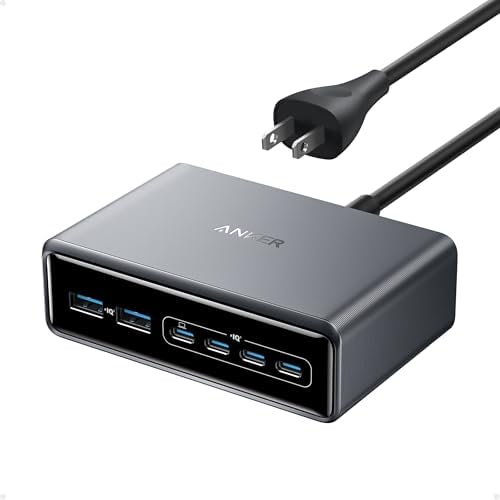
The Anker Prime 200W is a desktop charger for people who want fewer adapters without needing a large tray of device slots. It can power six devices at once, with up to 200W total output. The product description says that when two USB-C ports are used together, each can provide up to 100W. That makes it a useful option for a desk with two USB-C laptops or a laptop plus several smaller devices.
At about 4.4 by 3.0 by 1.4 inches, it has a compact footprint compared with the 10- and 20-port organizers. It comes with a five-foot AC power cord and a 24-month warranty. Anker also describes temperature monitoring as part of its safety system. This unit is designed for desktop use and is not intended for travel.
Unlike the Zobirez and Moezuti stations, this charger does not provide dividers to hold phones and tablets upright. You will need to arrange your devices and cables on the desk yourself. It is also a six-port option, so it is a better fit for a small collection of higher-demand devices than a classroom or large family charging hub.
Pros:
- Six-device charging in a compact desktop format.
- Up to 100W from each of two USB-C ports when both are in use.
- Includes a five-foot AC power cord.
- Temperature monitoring is part of the described safety system.
Cons:
- It has fewer ports than the multi-device organizers in this list.
- It is designed for desktop use rather than travel.
Verdict: Pick the Anker Prime 200W if you need a compact six-device charger with substantial USB-C power, not a storage dock for a large group of phones and tablets.
Best high-capacity choice for shared spaces: Moezuti 800W

The Moezuti charging station is the biggest organizer in this group, with 20 mixed USB-C and USB-A ports and a listed total output of up to 800W. Its port layout includes two USB-C ports rated for up to 65W, ten USB-C ports rated for up to 30W, and eight USB-A ports rated for up to 20W. That spread is aimed at shared spaces where many devices need power at once, including laptops, tablets, phones, and earbuds.
Its fixed ABS slots hold devices upright, with two wider center bays intended for laptops or tablets in thicker cases. The package includes a five-foot power cord and ten short cables in several connector types. The station is a much larger-format solution than either Anker charger, so it makes the most sense when the number of devices—not portability or a minimal footprint—is the main concern.
The two 65W USB-C ports are the ones to consider for laptop charging; the other USB-C and USB-A ports have lower listed limits. Although the station advertises 800W total output, that number alone does not establish what each connected device will receive in every configuration. Match the port rating to each device and check for power-sharing details if you plan to use many ports at the same time.
Pros:
- Twenty mixed USB-C and USB-A ports provide the highest capacity in this selection.
- Two USB-C ports are listed at up to 65W for laptop charging.
- Fixed slots and wider center bays help keep devices separated and upright.
- Includes a power cord and ten short cables.
Cons:
- Its large port count and organizer design may be excessive for a small desk.
- Most ports have lower individual output ratings than the two laptop-focused ports.
Verdict: Choose the Moezuti 800W if you need one central charging hub for a large group of devices and can use its 20-port footprint.
Best for monitoring charging at your desk: Anker Prime 250W

This Anker Prime charger provides six ports—four USB-C and two USB-A—with a listed total output of up to 250W. Its first USB-C port is rated for up to 140W, which is the standout feature for compatible high-power devices. A small LCD display shows charging information, while a control dial lets you adjust output settings.
The screen and dial set it apart from the simpler desktop chargers here. They can be useful if you want a clearer view of charging status or more direct control, but they are not essential for someone who only needs a basic multiport power source. The charger measures about 4.18 by 1.58 by 3.64 inches and weighs about 22.58 ounces. It is designed for desktop use and is not recommended for travel.
The product description says that the Anker app is needed to fully enable its IoT features and that it supports 2.4 GHz Wi-Fi, not 5 GHz Wi-Fi. Consider whether those connected features matter to you before choosing it. Compared with the 200W Anker, this model offers a higher total output, a display, and a control dial; compared with the organizer-style stations, it has fewer ports and no device-holding slots.
Pros:
- Four USB-C and two USB-A ports serve a mix of devices.
- The first USB-C port is listed for up to 140W.
- LCD display and control dial provide charging information and output adjustment.
- Compact desktop form compared with a multi-device slot organizer.
Cons:
- Six ports may not be enough for a large household or shared workspace.
- It is designed for desktop use, and its connected features have a 2.4 GHz Wi-Fi requirement.
Verdict: The Anker Prime 250W is a strong fit for a desk where you want a high-output USB-C port and visible charging information, but it is not the best choice for organizing a large number of devices.
How to Choose a Charging Station for Multiple Devices
Count your devices and leave room for your routine
Start by counting the devices you expect to charge at the same time, not just the devices in your home. Include phones, tablets, headphones, e-readers, game controllers, and laptops if they regularly share the same charging spot. A six-port desktop charger may suit a small personal setup, while a 10- or 20-port organizer is more appropriate for families, classrooms, or shared offices. A few open ports can also make the station easier to use when someone brings home a new device.
Match port types to your cables
Check whether your devices use USB-C, USB-A, or another connector. A station with a mix of USB-C and USB-A ports can accommodate a wider range of existing cables, while a USB-C-heavy charger may be a better fit if most of your newer devices use that connection. Included cables are convenient, but check their connector type and power rating against the devices you plan to charge.
Look beyond the total wattage
A station’s total output describes its overall listed capacity; it does not necessarily mean each port can deliver its maximum power at once. Compare the individual port ratings with the needs of your laptop or other high-power device. Also look for details about how output is shared when several ports are active. For a laptop, confirm that the port and cable can provide the charging power the manufacturer recommends.
Decide whether you need slots or just ports
Organizer-style stations use slots to hold devices upright and separated, which can make a shared charging area easier to manage. Check the slot width and height if you plan to use thick cases or larger tablets. A compact desktop charger uses less room and may be a better match if your devices already sit on stands or you want a simple power source without built-in storage.
Consider size, placement, and portability
Measure the desk, counter, or nightstand where the station will sit. A 20-port organizer can take more space than a six-port desktop charger, even if you do not fill every slot. Check the power-cord length and think about where the nearest outlet is. If you need a charger for travel, pay attention to whether the product is designed for that use; some desktop models are explicitly not intended for travel.
Check safety features and product details
Look for clearly described protections, such as protection from overcurrent, overvoltage, overheating, overload, and short circuits. These features do not remove the need to use compatible cables and follow device instructions, but they can help you compare designs. For products that list special app or Wi-Fi functions, confirm that the requirements fit your setup before buying.
Frequently Asked Questions
Can one charging station charge a laptop and a phone at the same time?
Yes, if the station has a suitable port for the laptop and enough output for the connected devices. Check the laptop port’s individual power rating and the station’s power-sharing details. Use a cable rated for the power your laptop requires.
Does a higher total wattage always mean faster charging?
No. Total wattage is only one part of the picture. The device, cable, port rating, and how the station distributes power among active ports all affect charging speed.
Are USB-C ports better than USB-A ports?
Neither type is automatically better for every device. USB-C is common on newer phones, tablets, and laptops, while USB-A remains useful for older cables and accessories. Choose a mix that matches the devices you actually own.
Should I choose a station with built-in device slots?
Slots can keep phones and tablets upright and help organize a shared charging area. They are less important if you only need a charger for devices that already have stands or if you prefer a smaller desktop unit. Check slot dimensions if you use thick cases.
Can I use my own charging cables?
In general, you can use compatible cables that match the port and the device’s charging needs. Check the cable’s connector and power rating, especially for laptops or other devices that need more power.
Which option is best for a large family or classroom?
The Moezuti 800W has 20 mixed ports and is the highest-capacity organizer in this group. The Zobirez 750W and 420W models each offer ten-device organization and may suit a smaller shared area.
Which charging station is the best choice for most people?
There is no single best fit for every setup. Choose a compact Anker desktop charger for a smaller number of devices, a 10-port Zobirez station for an organized shared desk, or the Moezuti if you need many charging positions in one place.
Final Recommendation
For a high-capacity shared charging area, the Moezuti 800W offers the most ports and a built-in organizer. The Zobirez 750W is a more compact alternative with ten positions and several high-output USB-C ports, while the Zobirez 420W covers everyday mixed-device charging with two listed 65W laptop ports. If you prefer a smaller desktop charger, consider the Anker Prime 200W for straightforward six-device charging or the Anker Prime 250W for its display and control dial. Before choosing, compare each port’s rating with your devices and check how the station handles multiple active connections.