

A sheet-fed document scanner can turn a stack of paperwork into searchable digital files much faster than scanning pages one at a time. The right choice depends on how much you scan, how much desk space you have, and whether you need wireless access, a flatbed, or a larger automatic document feeder. These five options cover compact home setups, higher-volume batches, and mixed document types.
| Scanner | Feeder and speed | Connectivity | Best suited for |
|---|---|---|---|
| ScanSnap iX2500 | 100 sheets; up to 45 ppm duplex | Wi-Fi 6 and USB-C | Frequent batch scanning and shared use |
| ScanSnap iX1300 | Up to 30 ppm duplex | Wi-Fi and USB | Compact home or small-office setups |
| Epson WorkForce ES-C220 | 20-page feeder; up to 30 ppm | Not specified in the supplied product details | Small work areas and mixed document types |
| Epson WorkForce ES-500W II | 50 sheets; up to 35 ppm duplex | Wireless | Regular office batches and cloud workflows |
| Visioneer Xerox Duplex Combo | ADF; up to 25 ppm duplex | PC and Mac | Paperwork plus books, photos, and cards |
Our Picks: Best document scanners with sheet feeder reviews
ScanSnap iX2500: Best for fast, high-capacity scanning

The ScanSnap iX2500 is the most capable high-volume option in this group. Its 100-sheet automatic document feeder and stated duplex speed of up to 45 pages per minute make it a good fit for a home office or small team that regularly works through thick stacks.
A large touchscreen lets you choose personalized scan profiles, while Wi-Fi 6 and USB-C provide wireless and wired connection options. The scanner can send files to computers, mobile devices, and cloud services. Its software is designed to help organize and optimize scans of documents, receipts, photos, and business cards.
Paper-handling safeguards include a brake roller system, skew detection, and a multi-feed sensor that detects pages stuck together. These features are useful when a missed page or damaged original would be a problem. The main trade-off is its larger footprint compared with the compact models here. If you scan only a few pages now and then, its larger feeder and advanced controls may be more than you need.
Pros:
- Large 100-sheet feeder for bigger batches
- Fast duplex scanning, rated up to 45 ppm
- Wi-Fi 6, USB-C, touchscreen profiles, and cloud support
- Multi-feed and skew detection help protect originals
Cons:
- Its larger feature set may be unnecessary for occasional scanning
- Requires more space than the compact choices
Verdict: Choose the iX2500 if you want a fast, versatile scanner with a large feeder and multiple ways to send files.
ScanSnap iX1300: Best compact wireless scanner

The ScanSnap iX1300 is designed for people who need an automatic scanner but do not want a bulky desktop unit. Its space-saving design suits a crowded desk, and it can scan two sides at once at speeds of up to 30 pages per minute.
It connects by Wi-Fi or USB and can send scans to computers, mobile devices, and cloud services. The included ScanSnap software brings together tools for managing documents, receipts, photos, and business cards. Automatic skew correction, color optimization, and blank-page removal are intended to reduce manual cleanup.
The scanner handles a range of items, including thick documents and plastic cards, and can be used without a computer. The supplied product details do not list its feeder capacity, so it is harder to compare its batch size directly with models that specify a 50- or 100-sheet feeder. For large jobs, the iX2500 or Epson ES-500W II has a clearer capacity advantage.
Pros:
- Space-saving design for smaller desks
- Duplex scanning at up to 30 ppm
- Wi-Fi and USB connections, with computer-free use available
- Handles documents, photos, thick items, and plastic cards
Cons:
- Feeder capacity is not stated in the supplied product details
- Slower rated speed than the iX2500 and ES-500W II
Verdict: Pick the iX1300 if conserving desk space and having wireless scanning matter more than a clearly specified large feeder.
Epson WorkForce ES-C220: Best small scanner for varied documents
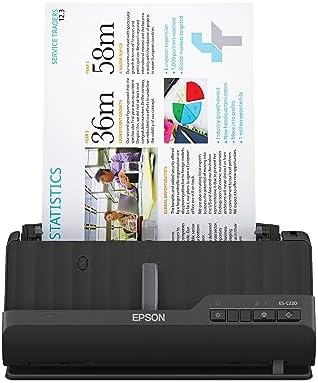
The Epson WorkForce ES-C220 pairs a compact body with a 20-page automatic document feeder. It scans both sides in one pass at up to 30 pages per minute, making it a practical choice for smaller batches of office or household paperwork.
Its flexible scan path is designed to accommodate standard paper, cards, and passports. Epson ScanSmart software includes preview and sharing tools, automatic file-name suggestions, and OCR features. Image adjustments include automatic cropping, blank-page deletion, background removal, skew correction, and staple protection.
The 20-page feeder is smaller than the 50-sheet and 100-sheet options in this group, so you may need to reload it more often for large jobs. The supplied details also do not list wireless connectivity, so check the connection requirements before choosing it if you want to scan directly from a phone or over Wi-Fi.
Pros:
- Compact design intended to save desk space
- Duplex scanning at up to 30 ppm or 60 images per minute
- 20-page feeder handles batches of varying sizes
- Supports documents, cards, and passports
Cons:
- Smaller feeder than the iX2500 and ES-500W II
- Wireless connectivity is not specified in the supplied details
Verdict: Choose the ES-C220 if you want a compact scanner for modest batches and need flexibility for cards or passports.
Epson WorkForce ES-500W II: Best for wireless office batches

The Epson WorkForce ES-500W II is a desktop scanner for people who regularly digitize paperwork and want wireless options. Its 50-sheet automatic document feeder and rated speed of up to 35 pages per minute make it a strong middle ground between the compact ES-C220 and the higher-capacity iX2500.
Single-Step Technology captures both sides of a sheet in one pass. The scanner can send files to smartphones, tablets, computers, and cloud storage through the Epson Smart Panel app. Epson ScanSmart supports file preview, sharing, and automatic naming. Included OCR can create searchable PDFs and convert scans to editable Word and Excel files.
It also supports extra-long pages up to 240 inches, along with business cards and ID cards. Ultrasonic double-feed detection is designed to catch pages that feed together, while image tools handle cropping, blank-page skipping, background removal, and skew correction. This is a larger desktop-style choice, so it makes more sense for regular scanning than for a shelf or travel setup.
Pros:
- 50-sheet feeder for substantial document batches
- Duplex scanning rated up to 35 ppm or 70 images per minute
- Wireless scanning and cloud-sharing options
- OCR, long-page support, and double-feed detection
Cons:
- Desktop design takes more space than compact models
- Its larger feeder and feature set may be excessive for occasional use
Verdict: The ES-500W II is a well-matched option for a home office or small business that needs wireless access, OCR, and a sizable feeder.
Visioneer Xerox Duplex Combo: Best for scanning books and flat items

Unlike the other sheet-feeder-focused choices, the Visioneer Xerox Duplex Combo combines an automatic document feeder with a flatbed. That makes it a flexible pick if you need to scan both stacks of paperwork and items that are awkward to feed, such as books, photos, or cards.
The ADF scans at up to 25 pages per minute or 50 images per minute at 300 dpi. Its listed maximum ADF paper size is 8.5 by 118 inches, and the flatbed gives you another way to handle originals. The scanner is compatible with PC and Mac with the included drivers.
The trade-off is speed: its stated rate is below the iX2500 and ES-500W II. The supplied product details do not specify the ADF’s sheet capacity or wireless connectivity, so it may be less convenient if you need to scan large batches without interruption or work away from a computer. Its flatbed is the reason to choose it over a faster feeder-only model.
Pros:
- Combines an ADF with a flatbed for varied originals
- Useful for books, photos, cards, and large documents
- Duplex scanning up to 25 ppm or 50 images per minute
- Compatible with PC and Mac
Cons:
- Lower stated scan speed than several other picks
- ADF capacity and wireless connectivity are not specified in the supplied details
Verdict: Choose the Duplex Combo if you need a flatbed for books or delicate items as well as a feeder for everyday documents.
How to Choose a Document Scanner with a Sheet Feeder
Match feeder capacity to your usual batch size
A larger feeder means fewer stops to reload pages, which matters when you scan long folders or recurring paperwork. The iX2500 holds up to 100 sheets, while the ES-500W II holds 50 and the ES-C220 holds 20. The supplied details do not state a feeder capacity for the iX1300 or the Visioneer Xerox model, so check that detail if batch size is a deciding factor.
Compare duplex speed, not just page speed
Duplex scanning captures both sides of a page in one pass, saving time when you handle double-sided forms or contracts. The listed speeds vary: the iX2500 reaches up to 45 ppm, the ES-500W II up to 35 ppm, and the iX1300 and ES-C220 up to 30 ppm. The Xerox Combo is rated up to 25 ppm at 300 dpi. Actual scanning time can also depend on the document and settings, so treat these as product specifications rather than a guarantee for every job.
Think about where and how you will connect
Wireless scanning can make it easier to send files to a phone, tablet, computer, or cloud service. The iX2500 lists Wi-Fi 6 and USB-C, the iX1300 offers Wi-Fi and USB, and the ES-500W II includes wireless options through Epson’s app. The supplied details do not specify wireless connectivity for the ES-C220 or Xerox Combo. If you plan to connect by cable or integrate the scanner with existing software, confirm that the connection and driver support fit your setup.
Choose a design for your available space
A compact scanner can be easier to keep on a crowded desk or store between jobs. The iX1300 and ES-C220 are specifically described as space-saving models. The iX2500 and ES-500W II offer larger feeders and broader workflows, but their desktop-style designs may suit a dedicated work area better. The Xerox Combo adds a flatbed, which takes a different approach to saving time: it handles items an ADF cannot easily accept.
Consider the originals you need to scan
For ordinary paperwork, a feeder-focused model may be enough. If you also scan cards or passports, the ES-C220 lists support for those items, and the iX1300 can handle thick items and plastic cards. For books and photos that should lie flat, the Xerox Combo’s flatbed is a useful feature. Think about the most unusual item you scan, not only the standard pages in your daily stack.
Check the file tools you will actually use
OCR can make scanned documents searchable or help convert them into editable files. The ES-500W II lists OCR for searchable PDFs and Word or Excel conversion, while the ES-C220 includes OCR features. The ScanSnap models focus on organizing and managing scans of documents and other everyday items. If you already use document-management software, look for driver compatibility; the ES-500W II specifically lists a TWAIN driver.
Frequently Asked Questions
What is a sheet feeder on a document scanner?
A sheet feeder accepts a stack of loose pages and moves them through the scanner automatically. An automatic document feeder, or ADF, is useful when you need to scan multiple pages without placing each sheet on a glass surface by hand.
What does duplex scanning mean?
Duplex scanning captures both sides of a page. Several models in this guide scan both sides in one pass, which is useful for double-sided paperwork and can reduce the time needed to digitize a stack.
Which scanner has the largest stated feeder capacity?
The ScanSnap iX2500 has the largest stated capacity in this group at 100 sheets. The Epson ES-500W II holds 50 sheets, and the Epson ES-C220 holds 20.
Which option is best for a small desk?
The ScanSnap iX1300 and Epson ES-C220 are both described as compact or space-saving. The iX1300 is a good fit if you want Wi-Fi or USB connectivity, while the ES-C220 offers a specified 20-page feeder and support for cards and passports.
Can a sheet-fed scanner scan books?
A feeder is not the best way to scan a bound book. The Visioneer Xerox Duplex Combo includes a flatbed for books, photos, and other items that should be placed flat, as well as an ADF for loose pages.
Do I need OCR?
OCR, or optical character recognition, can help make scanned text searchable or convert it into editable files. It is useful if you need to find words inside saved documents or work with text in another application. Check the included software details to confirm the OCR functions you need.
Which scanner should I choose for regular office use?
For frequent large batches, the ScanSnap iX2500 offers the largest stated feeder and highest listed speed in this group. The Epson ES-500W II is another strong option if you want wireless scanning, OCR, and a 50-sheet feeder. Choose the one that best matches your batch size, connection needs, and available desk space.
Final Recommendation
The ScanSnap iX2500 is the strongest all-around choice here for frequent scanning, thanks to its 100-sheet feeder, fast duplex rate, and Wi-Fi 6 or USB-C connections. If you need a more compact scanner, consider the iX1300 or ES-C220. For a flatbed that can handle books and photos alongside loose pages, the Visioneer Xerox Duplex Combo is the specialized pick.